
Thor X1 review: the first BM1373 chip at home
For two years, almost every desk miner has used the same chip, the BM1370. The Hammer Miner Thor X1 is one of the first machines with the new BM1373, built on a finer process. The promise: about two and a half times a Bitaxe Gamma’s hashrate, with better efficiency. I measured it at the wall.
Published 24 September 2026 · by Pixel
Machine sent by MineShop, a partner of the channel. The measurements are my own, taken with a wall meter. My partner code is in Support.
VideoThe review on video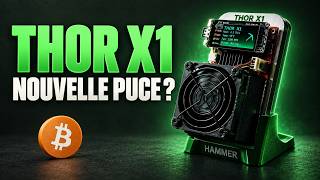 I tested the first BM1373 Bitcoin miner! (Thor X1)On YouTube, in French with subtitles
Spec sheet
Hammer MinerBC01 Pro (same board)BM1373, 3 nm2.1 TH/s · 22 W · 10.6 J/TH3.22 TH/s · 46 W · 14.2 J/TH34 dB normal, 51 dB overclock2.4 GHz Wi-Fi, no Ethernet65 W USB-C brick (Lenovo) includedThorOS, closed sourceabout $259 in the US, €215 to €220 in Europe- Best measured efficiency: 10.6 J/TH in normal mode, versus about 15 for a Bitaxe Gamma.
- Careful build: big heatsink, a second heatsink on the power stage, good fan.
- Small footprint, rich colour AMOLED screen.
- Cheaper per TH/s than two Bitaxe Gammas.
- Closed software (ThorOS): the code cannot be read or fixed.
- Loud in overclock for a desk.
- The chip does not like settings outside factory values.
- Wi-Fi only, no Ethernet.
Watch the name
The same machine is sold as Thor X1 by some and BC01 Pro by others: same board. But Thor on its own means the BC04, a completely different machine with four previous-generation chips. Check the chip, not the name. US units have a red board, mine is black: same board.
Build quality
The main heatsink is big for the machine’s size, and a second heatsink sits on the back, on the power stage: exactly where it gets hot. That is the kind of detail added so a machine lasts for years, not just day one.
There are two USB-C ports, one for the screen and one for the board; the screen’s port has a rubber plug to avoid mistakes. A thick 3D-printed stand with a cable clip and a 65 W USB-C power brick complete the box. I have handled a lot of desk miners: this one feels premium.
ThorOS instead of AxeOS
The Bitaxe runs AxeOS, built on ESP-Miner, an open-source project: the code is public, anyone can read and fix it. The Thor X1 runs ThorOS, Hammer’s in-house system, whose code is not published. Being newer, it still lacks a few AxeOS features.
Setup is standard: change the machine’s name (essential once you have several), then the pool: address, port, your Bitcoin address as the user and x as the password. For solo, the FindMyBlock settings are in this guide.
Two traps that waste hours: if the machine runs but no shares go out, turn off TLS, which many pools do not support; and make sure there is no space before or after your Bitcoin address.
The screen
A colour AMOLED screen driven by two buttons: the top one turns it off, the bottom one cycles pages. You get hashrate with a small chart, power draw, fan speed, temperatures, the bitcoin price, the pool setup and frequency and voltage settings.
My favourite page: the latest blocks found, with the pool that mined them. When a solo miner hits the jackpot somewhere in the world, the machine shows you.
Wall-meter measurements
Measured at the wall after a good half hour of warm-up. Check the firmware before measuring anything: before version 1.0.1, a known bug reported an incomplete hashrate to the pool. Updating is one button at the bottom of the interface, and the machine restarts by itself.
2.1 TH/s for 22 W, i.e. 10.6 J/TH3.22 TH/s for 46 W, i.e. 14.2 J/THabout 15 J/THThe lesson of this machine: the mode advertised everywhere, the one with the biggest hashrate, is also the least efficient. Overclocking adds about 50% hashrate but more than doubles the power draw. On a machine running around the clock, that is what matters.
Do not trust the efficiency shown in the interface: it reads about 10 J/TH even in overclock, because it only measures the chip, not power supply losses. Some reviews quote 9 J/TH from that number: it is wrong. A wall meter does not lie.
Noise and overclocking
In normal mode the fan is perfectly fine. In overclock I find it quite loud for a desk miner: I will swap it for a Noctua.
I also tried pushing the chip: on my unit, the BM1373 is temperamental and tends to cut out as soon as you leave factory settings.
Versus two Bitaxe Gammas
For the price of a Thor X1 you get almost two Bitaxe Gammas. Two Gammas make 2.4 TH/s for 36 W, at 15 J/TH. The Thor X1 does 3.2 TH/s in overclock, or 2.1 TH/s for just 22 W. It wins on hashrate, efficiency, size and price per TH/s.
What the Bitaxe keeps: open software, fine tuning, a huge community, and redundancy, since two machines do not fail at the same time. Neither has Ethernet: 2.4 GHz Wi-Fi on both sides.
Odds of finding a block
In overclock, about 1 chance in 5,450 per year solo, and about 1 in 8,350 in normal mode (network as of 24 September 2026). It is not an investment, it is a lottery ticket; stacking machines does not change the game, it only moves the decimal point. The full math: How much does a Bitaxe earn?
My verdict
Buy it if you want the best efficiency on the market in the smallest format, with a careful build, to set up once and leave alone. And keep it in normal mode: that is where it shines.
Skip it if you want to audit the software, you enjoy tuning your machines, or you prefer spreading the risk over several small open machines. The hardware is excellent, the efficiency is stunning: the software is the compromise.
Other reviews
- NerdOctaxe review: 8 BM1370 chips on a deskTwo NerdQAxes in one case, close to 10 TH/s, for enthusiasts.
- NerdQAxe++ Hydro review: the water-cooled mini minerFour chips, pre-assembled liquid cooling, and office-level noise.