
NerdQAxe++ Hydro review: the water-cooled mini miner
The NerdQAxe++ Hydro combines three things I like: open source, liquid cooling and home mining. It is the water-cooled version of the NerdQAxe++, a four-chip machine derived from the Bitaxe idea. I tested revision 6.1.
Published 24 September 2026 · by Pixel
Machine sent by MineShop, a partner of the channel. The measurements are my own, taken with a wall meter. My partner code is in Support.
VideoThe review on video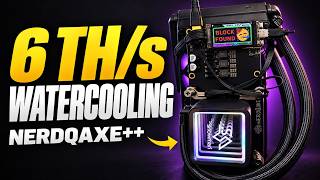 NerdQaxe++ Hydro: the WATERCOOLED mini Bitcoin minerOn YouTube, in French with subtitles
Spec sheet
NerdQAxe, derived from the Bitaxe, ready to useHydro, revision 6.14 × BM1370 (the S21 Pro generation)about 4.8 TH/saround 70 Wliquid, pre-assembled (block, tubes, radiator)12 V, 10 A (120 W), includedsmall ESP32 screen with buttons, not touchAxeOS, open source- Nothing to assemble: out of the box, plug in, it mines.
- Liquid cooling: stable temperatures, noise fine for a living room.
- Properly sized power supply included.
- Full AxeOS: backup pool, automatic fan, Discord alerts.
- Near-zero profitability, like every home miner.
- Slightly worse efficiency than the NerdOctaxe (over 15 J/TH).
- Manual in English only.
The idea
It all starts with the Bitaxe: a compact open-source mining board with the same kind of chip as big industrial machines, for about fifteen watts. The NerdQAxe family turns that idea into ready-to-use machines with several chips. The NerdQAxe++ Hydro is the water-cooled version, released around 2024 and revised several times since.
In the box
Plain, well-protected packaging. Everything is pre-assembled: the board with its four chips, the water block, the tubes and the radiator. Nothing to screw together.
The included power supply is 12 V, 10 A (120 W), sized to take the load without flinching. That matters: a generic supply or a weak charger can drop the hashrate or cause crashes. There is also a colour manual in English, a small screen to fit on the chassis and some RGB lighting.
Why water?
Liquid cooling keeps the chips at a steady temperature, improves lifespan and above all cuts noise sharply compared with an air-cooled machine. In use, temperatures stay reasonable and the noise is perfectly acceptable in a living room or office.
Setup
When powered, the machine creates its own Wi-Fi network, whose name starts with “NerdAxe”. Join it and the setup page opens by itself; otherwise type 192.168.4.1. Once the machine is on your Wi-Fi, open AxeOS at its IP address.
In settings: the pool address, your Bitcoin address as the user, then save and the machine restarts. You can also set a backup pool it switches to automatically if the first one stops responding. Full walkthrough: Set up a Bitaxe.
Useful settings
- Frequency and voltage: if you are starting out, keep the defaults.
- Fan: automatic or manual, with a target temperature and a shutdown temperature for safety.
- Updates: the installed version and new releases are shown in the interface. See Update AxeOS.
- Discord alerts: a message if the machine restarts or finds a block, handy when you are away.
- System: Wi-Fi signal quality, version and uptime.
Some users have pushed it to 8 TH/s overclocked, with well-managed cooling and a solid power supply.
My take
Let us be clear: profitability is close to zero. This is not a machine built to compete with industrial farms. It is designed for solo mining at home, for learning, collecting, or the pleasure of taking part in the network. Solo, its chance of finding a block is about 1 in 3,650 per year (network as of 24 September 2026).
For the numbers, see How much does a Bitaxe earn?, and to compare with other machines: all my reviews.
Other reviews
- Thor X1 review: the first BM1373 chip at homeThe best efficiency I have measured on a desk miner, with closed software.
- NerdOctaxe review: 8 BM1370 chips on a deskTwo NerdQAxes in one case, close to 10 TH/s, for enthusiasts.